A tracking link for your client projects. Like the one Amazon gives you for delivery.
Create a project tracking page. Share the link with your client. They see what’s done, what’s in progress, and what’s coming next - without messaging you.


Three steps. Two minutes.
One link.
Set up your tracker
Pick a template or start fresh. Add your project stages, set the timing between each one, and mark which steps need your client to do something - like approving a draft or making a payment.
Share the link
Send your client the tracking link - WhatsApp, email, wherever. They open it and see a clean progress page. No login. No app. No account needed.
The tracker runs itself
Stages auto-complete on your schedule. Your client checks progress whenever they want. You only step in for things that actually need you.
This is what
your client sees.
A simple page with their project name, your name, a delivery date, and every stage laid out - what’s done, what’s happening now, and what’s next. They check it the way they’d check an Amazon order. Except this one is for the website, logo, or funnel you’re building for them.
Create your tracking page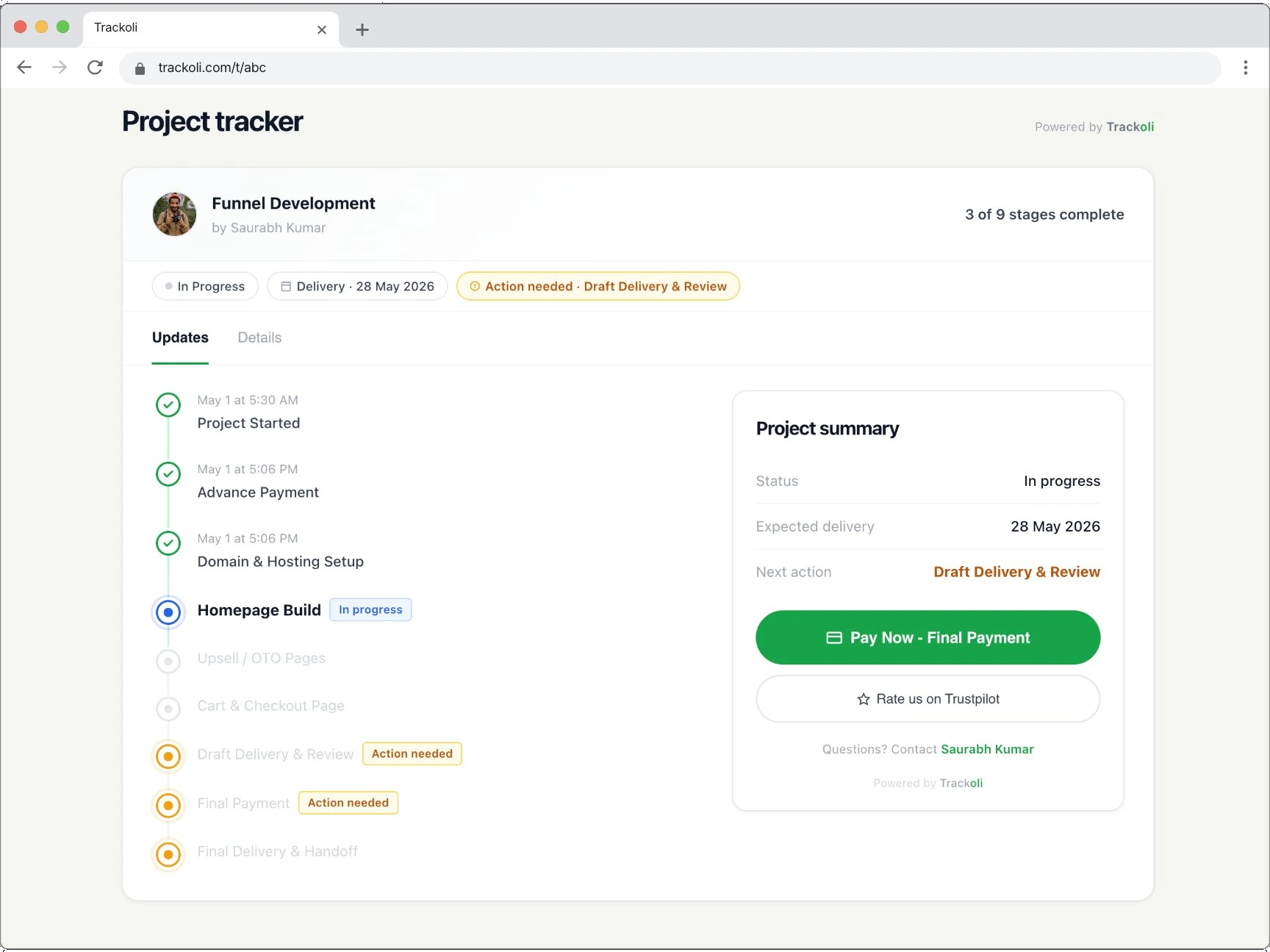
You don’t update it.
It updates itself.
Set the time between stages - one hour, two days, a week. The tracker moves forward automatically. Domain setup takes three days? It marks itself done on day three and the next stage begins. You only touch it when something actually needs your input. No daily checkbox ticking. No forgetting to update your client. The tracker just runs.
Set up your stages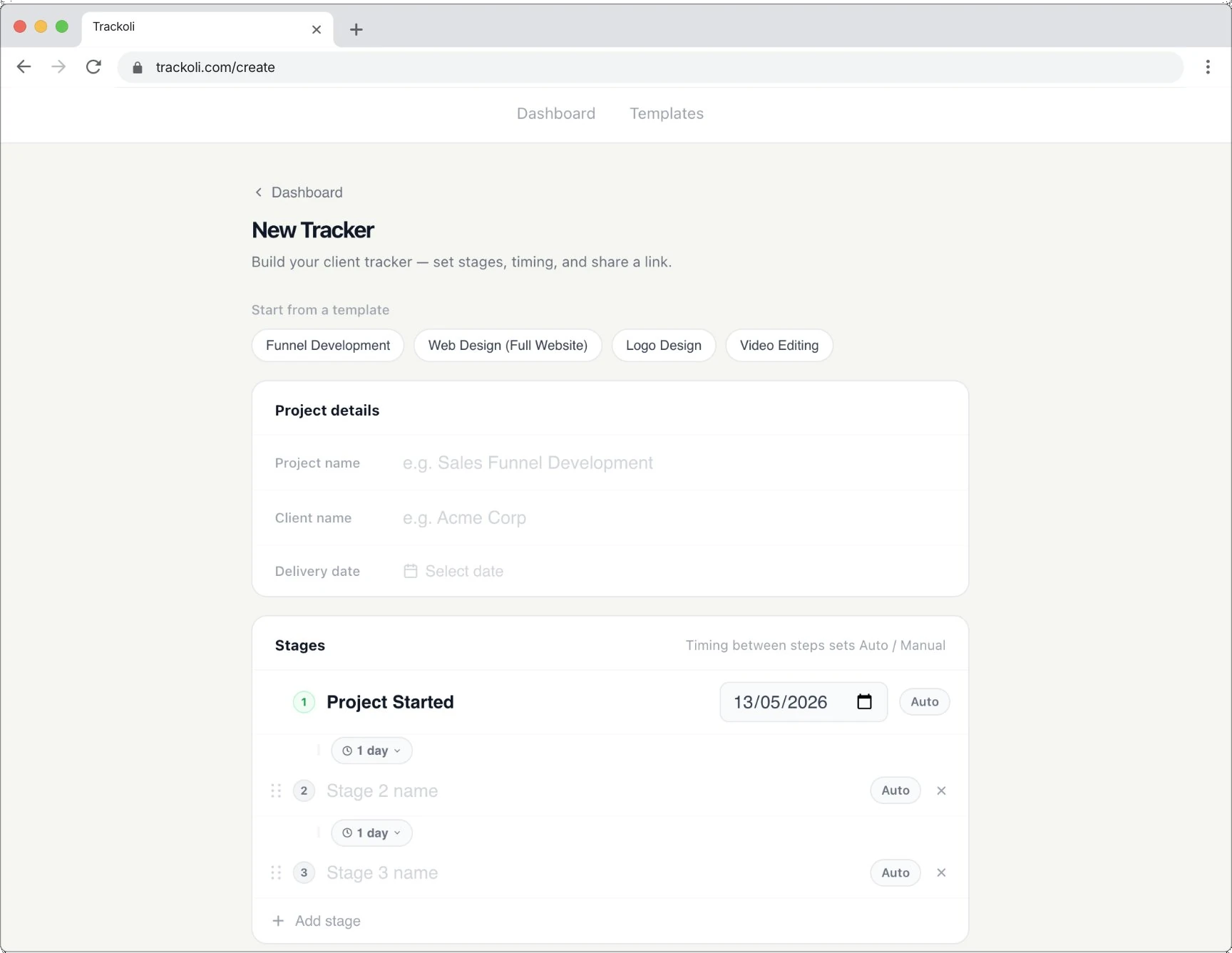
Your client knows when to pay. Without you asking.
Payment stages sit right inside the project flow. When the tracker reaches a payment milestone, your client sees it clearly - “Action needed: Advance Payment” - with a Pay Now button right there on the page. The project doesn’t move forward until they pay. This isn’t a payment tool. It’s transparency that makes payment obvious.
Add a payment stageWhat else is in there
Client visit analytics
See when your client last visited the tracking page, how many times they've checked, and whether they clicked the payment button. If someone says they didn't see it - you'll know.
Two custom buttons
Add any two buttons to your tracking page. Pay Now, Rate us on Trustpilot, Refer a Friend, Book Next Project - whatever matters to you.
12 ready-made templates
Funnel development, website builds, logo design, content packages, branding projects - pick one, customize the stages, and you're live in two minutes.
Manual gates
Some stages shouldn't auto-complete. Client review, payment, approval - set these to Manual and the project pauses until your client takes action.
If you work with clients, this is for you.
It doesn’t matter if you build websites, design logos, write copy, run ads, edit videos, or consult. If you’ve ever had a client ask “any updates?” - or if you’ve ever dreaded sending a payment reminder - you already understand why this exists.
What’s next
Both are coming soon.
Custom domains
Use your own domain for the tracking page.
Email notifications
Your client gets an email every time a stage completes.
Create your first tracking link.
Two minutes. Free. Your client will thank you.
Get StartedFree · Invite only · No credit card